Industrial · server-powered
Code 93 generator.
Code 93 was introduced by Intermec as a tighter, more secure successor to Code 39: the same characters, a fixed nine module structure and two check characters instead of none. It never displaced Code 128 in the wider market but remains the correct pick where an existing system expects it. This generator computes both check characters for you and exports free PNG or vector SVG.
Denser successor to Code 39.
Standards-based quiet zones are always on. For production packaging, verify a printed sample with a barcode verifier.
Preview
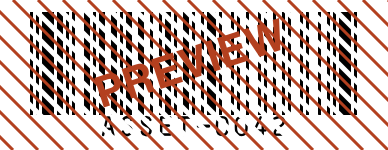
- Renders on our servers, the one Plume tool that does.
- We keep the code type and content length, never what you encode.
- Free SVG vector + up to 600 DPI PNG, commercial use allowed.
- Full details in the privacy policy.
Valid Code 93 input
Code 93 takes the same 43 data characters as Code 39: digits, capital letters, the space, and the symbols hyphen, period, dollar sign, slash, plus and percent. Length is up to you (this tool accepts as many as 2048 characters, far beyond anything practical), and lowercase letters are rejected rather than converted, so uppercase your data first.
Unlike Code 39, every Code 93 symbol carries two check characters, known as C and K and calculated modulo 47. The generator derives both from your input and appends them invisibly; they never show in the text under the bars and scanners drop them on decode, so type only your actual content.
Working sample: ASSET-0042 an uppercase asset ID valid in both Code 39 and Code 93, shown here in the denser of the two.
Where Code 93 is used
- Asset and inventory tags where label space is tight
- Electronics and component marking
- Courier and postal systems, Canada Post being the best documented adopter
Common errors and how to fix them
- Code 93 must only contain digits, capital letters, spaces, the symbols -.$/+ and shift non-data characters
- Something in your input, commonly a lowercase letter, underscore or hash, falls outside the allowed set. Stick to capitals, digits, spaces and the symbols hyphen, period, dollar sign, slash, plus and percent (percent is accepted even though the message omits it), or generate Code 128 if you need more.
- Enter the content to encode.
- There is nothing to encode yet. Add the tag or ID text and the preview updates immediately.
- Content is too long (max 2048 characters).
- The hard cap is 2048 characters, but a linear symbol that long is unusable. Encode a short lookup key instead, or move the payload to a 2D symbology such as QR or Data Matrix.
Size and printing
Code 93 exists to save width, and the effect is measurable: at identical settings this renderer draws the sample ASSET-0042 close to 40 percent narrower than its Code 39 equivalent. That headroom means you can hold a comfortable 0.25 to 0.35 mm module width on small labels instead of shrinking bars, paired with 8 to 12 mm bar height from the presets; the "Where will it be used?" picker applies matching defaults. For tiny component labels export PNG at 300 DPI or higher (the tool goes to 600), or take the SVG when your label software handles scaling.
Code 93 questions
What is the difference between Code 93 and Code 39?
They share one character set, but Code 93 draws each character in a fixed 9 modules where Code 39 needs nine elements, three of them wide, plus a gap, so Code 93 symbols come out much shorter. Code 93 also adds two mandatory check characters, giving it error detection Code 39 lacks.
Is Code 93 better than Code 128?
For purely uppercase data Code 93 is actually a little narrower, at 9 modules per character against 11; this renderer draws the sample tag at 388 pixels in Code 93 versus 462 in Code 128. Code 128 wins on digit-heavy content thanks to its double density numeric mode, handles lowercase, and enjoys far broader adoption, so pick Code 93 mainly when an existing spec asks for it.
Does Code 93 have a check digit?
It has two, the C and K characters computed modulo 47 over your data. This generator appends them automatically and they stay invisible: not in your input, not in the human readable line, and stripped by the scanner on decode.
Who uses Code 93 barcodes?
Canada Post has used it to carry supplementary parcel information, and it also appears in electronics manufacturing, military logistics and asset tracking where labels are small. New projects usually reach for Code 128 or a 2D code instead.